


Attivazione di Tungsten Power PDF Standard 2025.x (in linea)
Se si ha accesso a Internet (in linea), attivare Tungsten Power PDF Standard 2025.x come segue.
-
Avviare Tungsten Power PDF Standard 2025.x.
Per Windows 11
Selezionare il menu [Start] → [Tutto] → [Tungsten Power PDF Standard] → [Power PDF Standard].
Per Windows 10
Selezionare il menu [Start] → [Tungsten Power PDF Standard] → [Power PDF Standard].
Si visualizza la finestra [Attivazione del prodotto Tungsten Power PDF Standard].
-
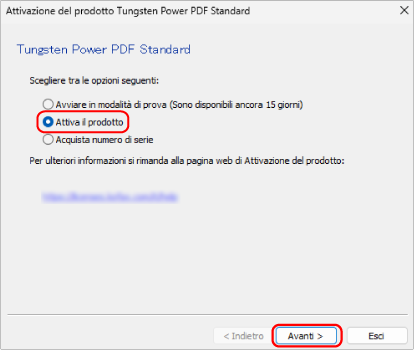
Selezionare [Attiva il prodotto] e cliccare il tasto [Avanti].
-
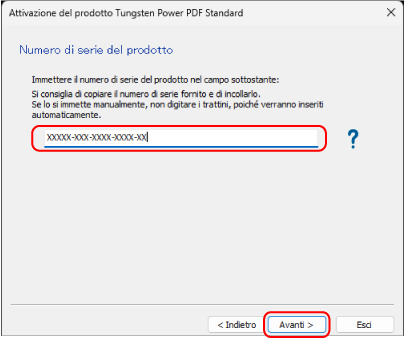
Inserire il numero di serie presente sul certificato di licenza di Tungsten Power PDF Standard/Tungsten Power PDF for Mac e cliccare il tasto [Avanti].
Si visualizza un messaggio indicante che l'attivazione è completa, quindi il processo è terminato.