


Activating Tungsten Power PDF Standard 2025.x (Online)
If you have access to the Internet (online), activate Tungsten Power PDF Standard 2025.x in the following procedure.
-
Start up Tungsten Power PDF Standard 2025.x.
For Windows 11
Select [Start] menu → [All] → [Tungsten Power PDF Standard] → [Power PDF Standard].
For Windows 10
Select [Start] menu → [Tungsten Power PDF Standard] → [Power PDF Standard].
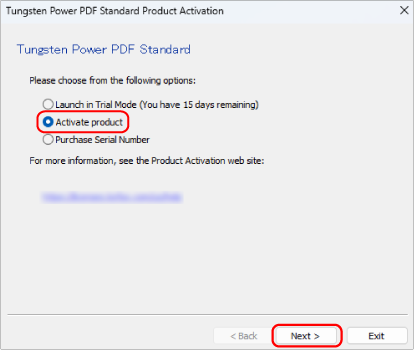
The [Tungsten Power PDF Standard Product Activation] window appears.
-
Select [Activate product] and click the [Next] button.
-
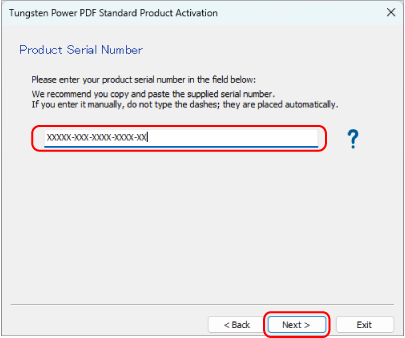
Enter the serial number that is on the license certificate of the Tungsten Power PDF Standard/Tungsten Power PDF for Mac and click the [Next] button.
A message indicating that the activation is complete appears, which completes the process.