


Activer Tungsten Power PDF Standard 2025.x (En ligne)
Si vous avez une connexion à Internet (en ligne), activez Tungsten Power PDF Standard 2025.x de la manière suivante.
-
Démarrez Tungsten Power PDF Standard 2025.x.
Sous Windows 11
Sélectionnez le menu [Démarrer] → [Tous] → [Tungsten Power PDF Standard] → [Power PDF Standard].
Sous Windows 10
Sélectionnez le menu [Démarrer] → [Tungsten Power PDF Standard] → [Power PDF Standard].
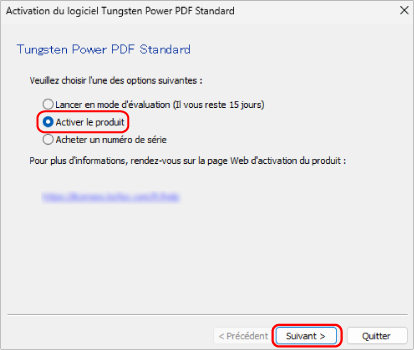
La fenêtre [Activation du logiciel Tungsten Power PDF Standard] s'affiche.
-
Sélectionnez [Activer le produit] et cliquez sur le bouton [Suivant].
-
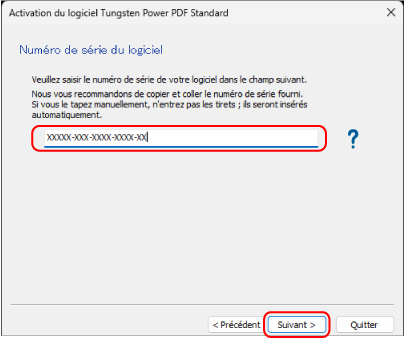
Saisissez le numéro de série qui figure sur le certificat de licence de Tungsten Power PDF Standard/Tungsten Power PDF for Mac, puis cliquez sur le bouton [Suivant].
Un message indiquant que l'activation est terminée s'affiche, et le processus se termine.