



Image Scanner Software PaperStream AI
PaperStream AI Overview
Advanced AI intelligent document automation solution
PaperStream AI is an advanced AI-driven document automation solution, enabling a seamless workflow from document capture to data utilization. By combining intelligent recognition with adaptive automation, it can transform various formats of documents without manual setup, turning captured documents into actionable data and insights, helping organizations improve efficiency and streamline operations.
- Automatic recognition of diverse document formats, reducing manual setup, verification, and processing time
- End-to-end automation from scanning to downstream data utilization in one software
- Seamless integration with existing backend systems to enable unified workflows
- Continuous learning to improve recognition accuracy over time
- Dashboard for operational visibility and performance improving
- Flexible, scalable usage plans supporting both departmental and enterprise deployment
PaperStream AI Features
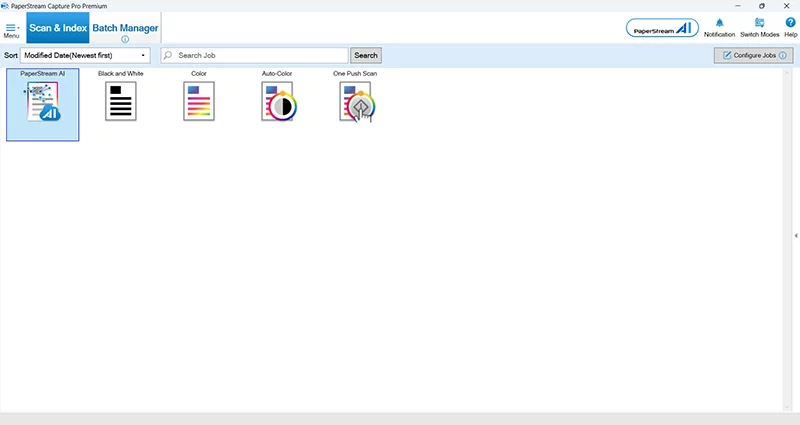
AI-driven recognition of diverse document formats
PaperStream AI automatically recognizes and processes documents of any format—without manual setup. From the very first scan, it adapts to different layouts and document types, enabling immediate use across a wide range of business scenarios.
- No template or manual configuration required, support invoice, purchased orders, and more
- Understand document structure for consistent and reliable data extraction
- Learns from user feedback to continuously improve recognition accuracy
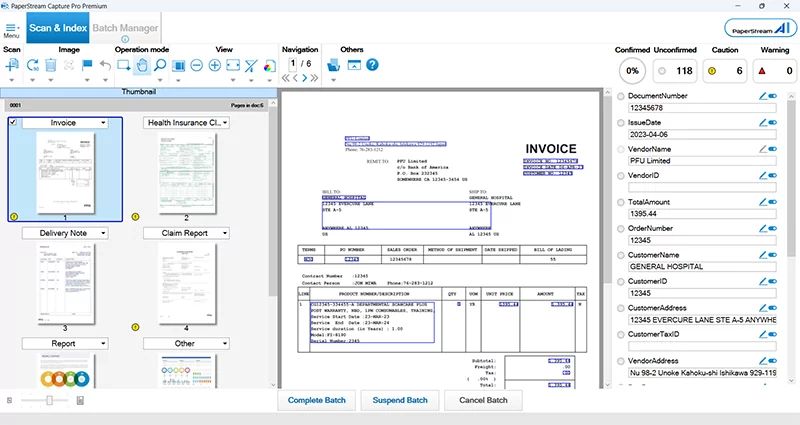
99.99% (1) recognition accuracy driven by PFU’s proprietary technology combined with generative AI
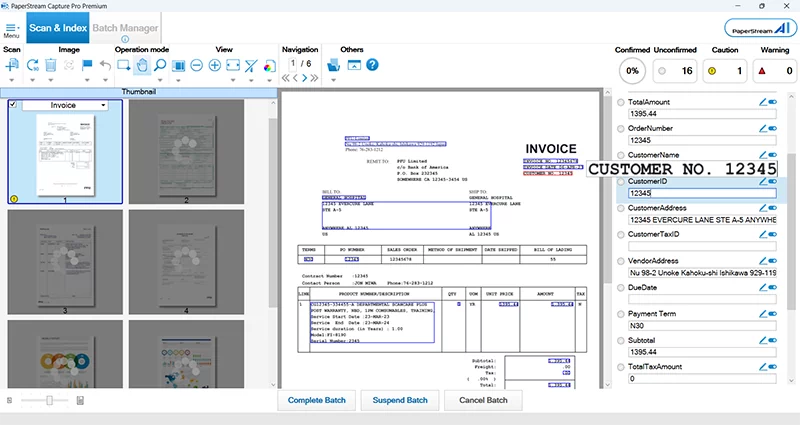
By leveraging PFU’s proprietary document analysis and high-precision OCR technologies and generative AI, PaperStream AI combines full-document structural analysis with high-precision character recognition, to deliver up to 99.99% (1) recognition accuracy. By cross-referencing multiple sources of information and refining results, it ensures highly reliable data extraction with reduced errors.
- Combines structural document analysis and proprietary OCR results for higher accuracy
- Improves data extraction reliability while minimizing recognition errors
- Leverages PFU’s proprietary OCR engine combined with generative AI to achieve a high-precision recognition
(1)Based on verification using PFU-defined standard forms. Recognition accuracy was measured using images scanned at 300 dpi in full colour. It is calculated based on a comparison between PaperStream AI recognition results following the training process and reference data prepared by PFU. Certain characters (such as spaces, commas and line breaks) are excluded from the evaluation.
End-to-end automation in one seamless workflow
From scanning to data utilization, PaperStream AI automates the entire document workflow within a single solution. By eliminating manual setup and enabling parallel processing, it significantly reduces processing time and operational effort. Under certain conditions, it enables organizations to achieve up to 98%(2) faster turnaround and higher productivity across document-driven processes, compared to typical cloud-based AI OCR services.
- Automatically extracts and prepares AI-driven data for downstream systems
- Reduces manual configuration and verification steps
- Enables parallel processing of scanning, recognition, and validation within one software
(2)Based on verification conducted by PFU using A4 invoice documents (printed text) scanned at 300 dpi in full colour. OCR processing time was measured from the start of recognition processing to completion by PaperStream AI. Scanning, verification and correction times are estimated based on typical operational assumptions. Actual time savings may vary depending on document content, workflow and operating environment.
Uncover insights through built-in dashboard
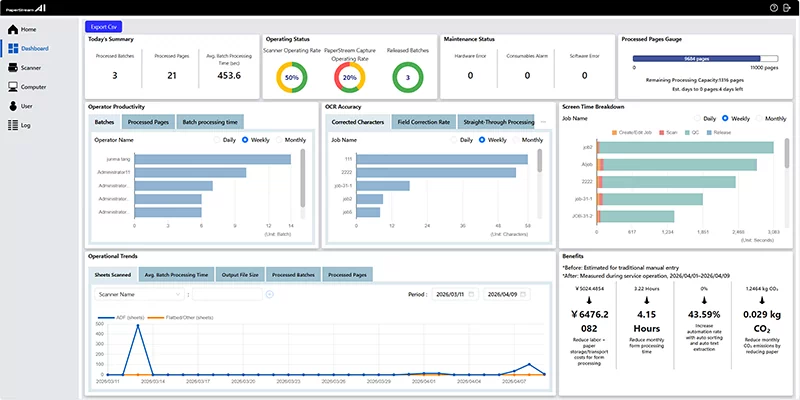
PaperStream AI goes beyond automation by providing clear visibility into document operations. With a centralized dashboard, organizations can optimize performance, identify bottlenecks, and continuously improve workflows.
- Real-time visibility into processing status and system usage
- Analytics to identify workflow inefficiencies and optimization opportunities
- Supports data-driven decision-making and process improvement
*This is a placeholder image.
Shareable across multiple departments to drive company-wide efficiency
Designed for both departmental use and enterprise-wide deployment, PaperStream AI scales with your organization as it grows. Flexible plans make it easy to expand usage across teams and business units.
User-based easy custom connector and developer-led release API enables integration of digitalized information with downstream systems, supporting more flexible use to meet different needs.
- Usage-based, scalable plans to match business needs
- Integrates with existing backend systems and workflows
- Enables unified, consistent operations across departments
Specifications for PaperStream Capture Pro and PaperStream Capture Pro Premium
As of October 6, 2026
| Product Name | PaperStream Capture Pro | PaperStream Capture Pro Premium | |
|---|---|---|---|
| Supported Scanners | Workgroup | fi-8040/fi-70F/fi-8170/fi-8270/fi-8150/fi-8250/fi-7300NX/fi-800R/SP-2240/SP-2230/SP-1425 | |
| Departmental | fi-8190/fi-8290/fi-7480/fi-7460 | ||
| Low-Volume Production | NA | fi-7700/fi-7700S/fi-7600 | |
| Mid-Volume Production | NA | fi-8950/fi-8930/fi-8820 | |
| Discontinued | fi-7030/fi-7180/fi-7280/fi-7160/fi-7260/fi-7140/fi-7240/fi-65F/SP-1130N/SP-1125N/SP-1120N/fi-6140Z/fi-6240Z/fi-6130Z/fi-6230Z/fi-6110/fi-5530C2 | fi-7030/fi-7180/fi-7280/fi-7160/fi-7260/fi-7140/fi-7240/fi-65F/SP-1130N/SP-1125N/SP-1120N/fi-6140Z/fi-6240Z/fi-6130Z/fi-6230Z/fi-6110/fi-5530C2/fi-5950/fi-7900/fi-7800/fi-6800/fi-6770/fi-6750S/fi-6670 | |
| Other TWAIN Devices*1 | Limited devices*2 | No limitation | |
| Supported OCR Languages | Printed character*3 | English, French, Spanish, German, Italian, Portuguese (Brazil), Russian, Japanese, Korean, Chinese (Simplified/Traditional), Turkish, Arabic, Greek, Vietnamese, Thai, Indonesian, Swedish, Dutch, Polish, Czech, Romanian, Hebrew, Ukrainian, Danish, Norwegian, Hungarian, Finnish | |
| Handwritten block letters *4 |
English, French, Spanish, German, Italian, Japanese | ||
| Scanner Driver | PaperStream IP TWAIN | ||
| Documents Separation | Barcode (1D/2D) Blank page (single/duplex) Page count Zonal OCR Multifeed Patch code Press Ctrl Specific form Specific document (Scanner Driver) (Automatic Profile Selection) |
Barcode (1D/2D) Blank page (single/duplex) Page count Zonal OCR Multifeed Patch code Press Ctrl Specific form Specific document (Scanner Driver) (Automatic Profile Selection) File name |
|
| Save-to Destinations | Standard | Folder Network folder SharePoint SharePoint Online FTP SFTP/FTPs E-mail (via e-mail application) Printer Box*5 DocuWare*5 Laserfiche*5 Other App. |
|
| Optional*6 | Cloud services (Microsoft OneDrive/Dropbox/Google Drive) E-mail (through SMTP server) Internet FAX (through SMTP server) |
||
| Output File | Bitmap, TIFF, Multi-TIFF, JPEG, JPEG2000, Searchable PDF, PDF, PDF/A (PDF/A-1, PDF/A-2, PDF/A-3), PNG, RTF, Word, Excel, PowerPoint | ||
| Output Index File | XML, CSV, TXT | ||
| Extracted Data | Per Page | Barcode (1D/2D) Zonal OCR Manual Entry System Choice List Database Autofill Combination Split JSON Parsing JSON Value Passport ID Card (TD1 and TD2) |
|
| Per Form (Local) |
Barcode (1D/2D) Zonal OCR (Printed letters/Handwritten block letters) Check box Manual Entry Choice List |
||
| Per Form (Cloud) |
Zonal OCR (Printed letters/Handwritten block letters) | ||
| Data Extraction Fields (Maximum supported number) | Per Page | 100 | |
| Per Form | Local : 150; 100 (under type Cloud) Cloud: 100 |
||
| Data Extraction Forms (Maximum supported number) | Per Job | Easy Setup: 1, Advanced Setup: 150 | |
| Indexing | Per document, Per page, Per form | ||
| Field Rule | YES | ||
| Form Registration (Maximum supported number) | 1,000 forms | ||
| Other Functions | Assisted Scan, ASC*7, Multi-Station function*8 Job grouping function PaperStream AI*9, Mail Import*10 |
Assisted Scan, File Import, ASC*7, Multi-Station function*8 Job grouping function PaperStream AI*9, Mail Import*10 |
|
| Supported Operating System | Windows 11, Windows 10, Windows Server 2025, Windows Server 2022, Windows Server 2019, Windows Server 2016 | ||
| Hardware Requirements |
CPU*11*12 | Intel or Intel-compatible processors | |
| Display Resolution | 1280 x 800 Pixels or more, and 65,536 colors or more | ||
| Disk Capacity | 10 GB or more*13 | ||
| Software | Microsoft .NET Framework 4.7.2 or later Microsoft Internet Information Service 10.0 or later |
||
| Integration with PaperStream AI *14 | YES | YES | |
-
PaperStream Capture Pro and PaperStream Capture Pro Premium are designed to work with TWAIN-compatible scanners that adhere to TWAIN specifications version 2.3 or newer. However, some third-party scanner TWAIN drivers may not fully comply with this standard and could encounter compatibility issues and/or limited functionality. We recommend using the trial/evaluation version of the software to test your scanners and verify performance.
- Desktop devices (A4/Letter/Legal or smaller size documents).
- Available OCR languages when using third party scanners. English, French, Spanish, German, Italian, and Japanese.
- OCR for handwritten block letters does not support under Windows 32bit OS.
- Available when specified integration connectors are installed.
- Available when PaperStream Connector Option is installed.
- After Scan Correction.
- It is necessary to install at least one Scan Station or QC/Index Station in addition to the PaperStream Capture Pro Scan Station, since 2 or more stations are required in total to configure the "Multi-Station function".
-
The PaperStream AI License must be purchased separately.
-
The add-in for Outlook (classic) must be installed separately.
- Scanning speeds may vary due to the system environment.
- The scanner may not operate if the recommended CPU and memory capacity requirements are not met.
- Enough disk capacity is necessary for the saved file when scanning.
- The PaperStream AI license must be purchased separately.
Videos
Coming Soon


