Apr 21, 2026
PaperStream Capture Pro and Pro Premium Update 6.0
Enhanced workflow integration and quality control for everyday use
Version 6.0 of the PaperStream Capture Series(1) software for RICOH fi and SP Series image scanners is now available, delivering updates that improve integration with business systems, enhance quality control performance after scans, and support more efficient day-to-day document capture.
Key Features
1. Better integration with third party solutions
PaperStream Capture Pro 6.0 expands the integration capabilities by enhancing available Release APIs with support for form OCR, enabling a whole new set of solutions for managing structured form data.
In addition, this version introduces the easy-use “custom connector”, providing a simpler alternative for integration development that does not require coding. Connectors can be defined through simple configuration files rather than code, making creation of digitisation workflows simpler than ever.

[Applies to: PaperStream Capture Pro/PaperStream Capture Pro Premium]
2. Enhanced quality control performance
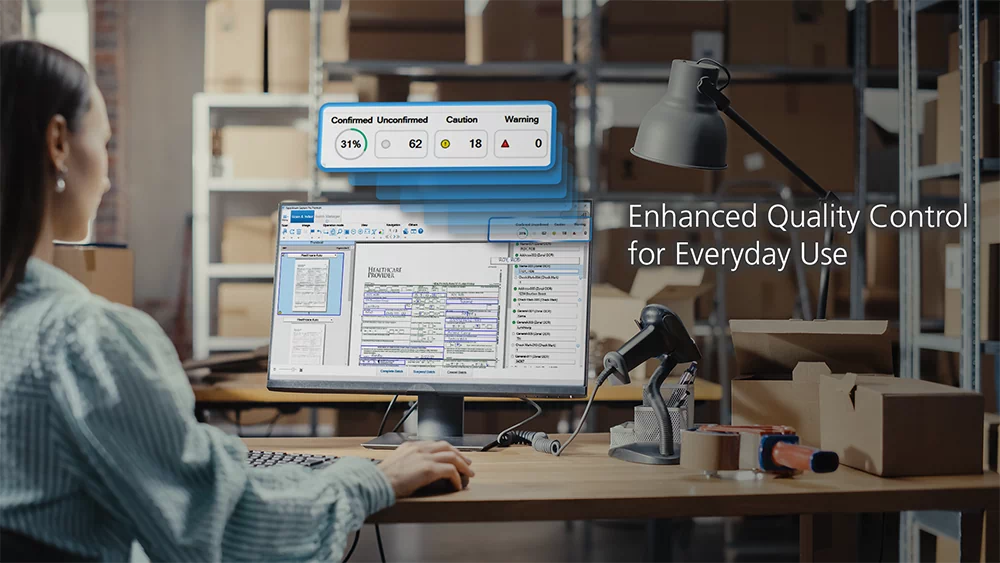
A key feature of PaperStream Capture has always been the dedicated quality control menus, with 6 document views available. Supplemented by the automatic image quality check feature which highlights potential errors with colored boxes.
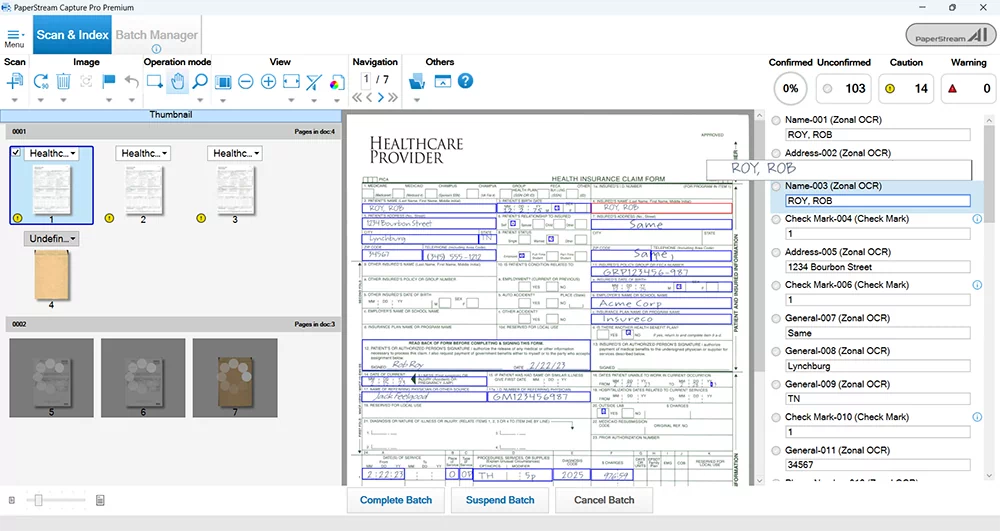
PaperStream Capture 6.0 enhances quality control performance by providing clearer visibility and greater control over the zonal OCR of fields on a form or document. Users can define confidence level thresholds for individual fields, establishing measurable quality expectations for OCR results. By setting confidence thresholds, users can concentrate review efforts on lower-confidence fields, enabling more targeted verification and improved operational efficiency.
Additionally, for all versions of PaperStream Capture, the QC window provides clear visual visibility of processing progress and field status in a single view, offering immediate insight into completion levels and a consolidated status view of OCR accuracy. This allows operators to quickly identify where attention is required and priorities their review efforts.
[Applies to:
Confidence level define: PaperStream Capture Pro/PaperStream Capture Pro Premium
QC progress view: PaperStream Capture/PaperStream Capture Pro/PaperStream Capture Pro Premium]
3. More usability improvements for daily operations
PaperStream Capture 6.0 also introduces usability improvements that help streamline routine document handling.
Integration with Microsoft Outlook adds a dedicated button to the Outlook ribbon, allowing users to send attached image files directly to PaperStream Capture Pro Premium with a single click. This supports faster and more consistent handling of documents received by email.
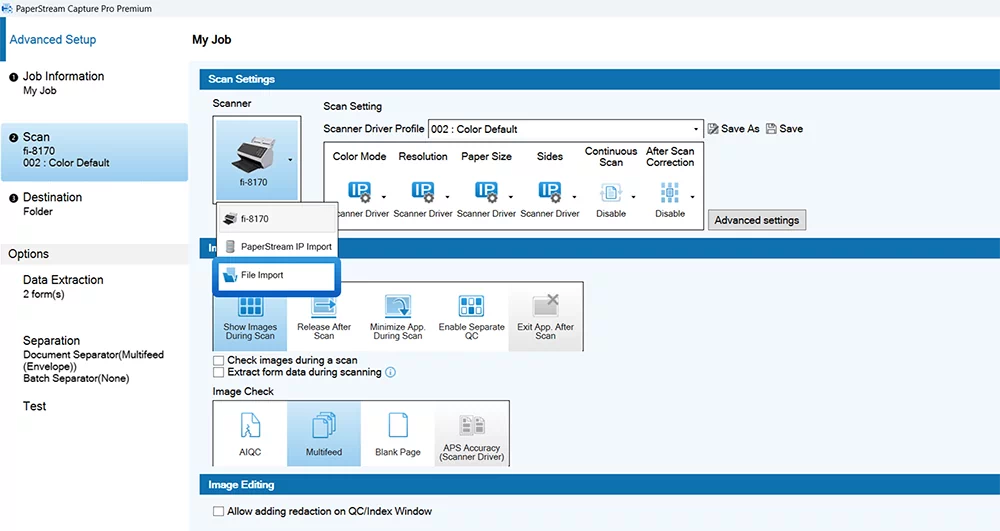
Additionally, the PaperStream Capture Pro Premium file import function supports importing image data from various sources and has been enhanced to import, process and output documents independently of the PaperStream IP (TWAIN) driver. Searchable text is retained where available, and the document’s structure is preserved during multi-page recognition to maintain contents logic of each page. This enables more coherent recognition across documents, delivering reliable, high-quality data that is immediately ready for downstream workflows.
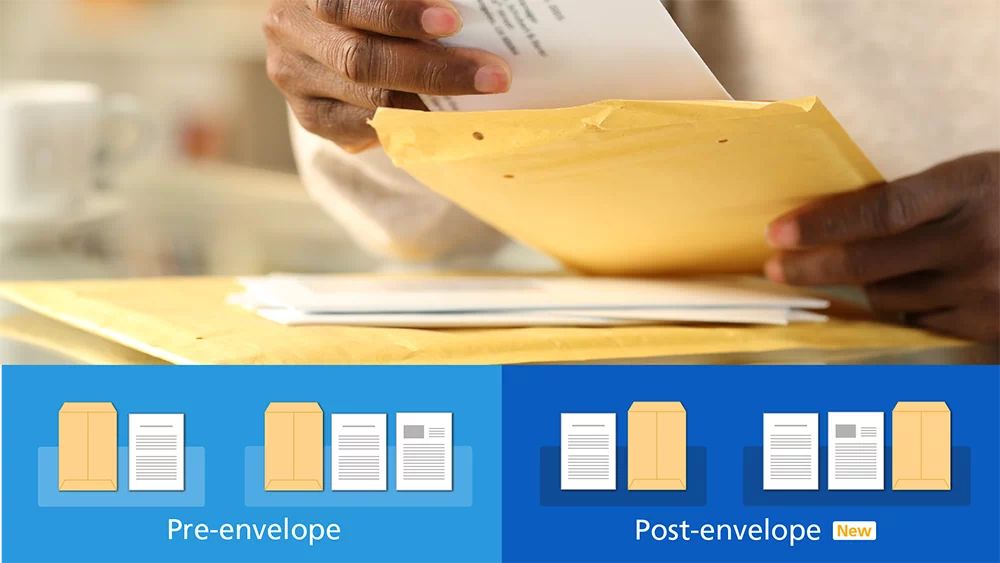
Envelope-based document separation has also been enhanced to provide greater flexibility. The software can be configured for batch scanning where the envelope is scanned before or after the contents helping operators manage real-world mailroom and batch-scanning workflows with less manual intervention.
In addition to the new features, the speed of operation of the software has also been improved. In multi-station environments, background OCR processing at the storage station is enabled, allowing the OCR results to be displayed as each page is recognized. Operators can begin confirmation without waiting for the entire batch to complete, enabling confirmation work to proceed alongside ongoing OCR and speeding up the entire operation.
[Applies to:
Microsoft Outlook ribbon/ File Import: PaperStream Capture Pro Premium
Background AI OCR/Envelope separation: PaperStream Capture Pro/PaperStream Capture Pro Premium]
| Product Name | Supported Scanners | Rollout Date |
|---|---|---|
| PaperStream Capture 6.0.0 | Please refer to the linked page. | April 30th, 2026 |
| PaperStream Capture Pro 6.0.0 | ||
| PaperStream Capture Pro Premium 6.0.0 |
Please visit the following websites to access the available downloads.
fi Series Software Downloads
SP Series Software Downloads
Notes
- (1) PaperStream Capture Pro and PaperStream Capture Pro Premium are designed to work with TWAIN-compatible scanners that adhere to TWAIN specifications version 2.3 or newer. However, some third-party scanner TWAIN drivers may not fully comply with this standard and could encounter compatibility issues and/or limited functionality. We recommend using the trial/evaluation version of the software to test your scanners and verify performance.
Trademarks
- - PaperStream is a registered trademark or trademark of PFU Limited.
- - Product names and company names are the registered trademarks or trademarks of the respective companies.
* The information contained in this news is accurate as of the date of publishing. Please understand that this information is subject to change without notice.