Archived content
NOTE: this is an archived page and the content is likely to be out of date.
Press Release -June 22, 2012-
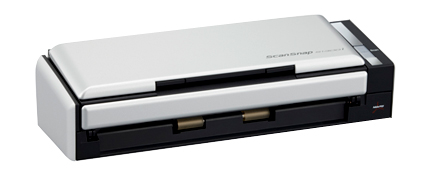
PFU Launches the Next Entry-level ScanSnap - S1300i
- The S1300i opens more usage possibilities with expanded ScanSnap "linkage" capabilities for Android smartphones/tablets and more various services -
PFU LIMITED (President & CEO: Kiyoshi Hasegawa; Tokyo Headquarters: Kawasaki City, Saiwai Ward, Japan), the world's leading scanner maker, has announced the release of the S1300i, the new entry-level model from the best-selling line of personal document scanners, the ScanSnap series, which deliver simple and speedy paper-to-PDF digitization in a compact design. The S1300i goes on sale globally starting June 22, 2012.
Compatible with both Windows® and Mac Operating Systems
More and more customers around the world choose ScanSnap series personal scanners because they deliver speedy, "one-touch" document digitization to PDF files.
The S1300i is the latest release from the ScanSnap line. Featuring the most complete set of ScanSnap features to date, the S1300i is the first series model to offer linkage capability to popular Android tablets and smartphones along with the currently supported Apple equivalents (i.e., iPad and iPhone). The S1300i also showcases ScanSnap Folder, a groundbreaking function that extends ScanSnap's linkage possibilities to more cloud services and applications than ever before. As the new entry-level ScanSnap model the S1300i significantly raises the bar in scanning speed, all while still applying the same automatic and "Intelligent" image processing functions that make ScanSnap the number one choice for effortless scanning. Everything is topped off with various software and hardware tweaks to give S1300i users the most pleasant scanning experience possible.
The ScanSnap series is ready to support your digitizing needs and advance your lifestyle by delivering simple, speedy scanning to an increasing range of supported products and services.
Product Features
1. Scan content to Android™ tablets/smartphones
ScanSnap Connect Application *1, the popular mobile app for saving PDF files produced by ScanSnap scanners directly to iPad and iPhone devices, is now available for Android users (Supports Android 2.2 or later), bringing seamless one-touch scanning (via auto syncing to the WiFi enabled computer) to more tablets and smartphones for convenient PDF viewing on the go.
2. Scan to greater possibilities using cloud services
The S1300i features the latest ScanSnap Quick Menu, which appears after scanning a document to help the user seamlessly link the digitized content to Web-based services Evernote, Google Docs, Salesforce, SharePoint® Online and SugarSync. And now ScanSnap supports Dropbox, one of today's leading online file syncing/storage services. With more cloud services to choose from, you are sure to find the right application for your documents.
1. ScanSnap welcomes Dropbox
The S1300i features the latest Quick Menu which helps users save their scanned documents to various cloud services with remarkable ease. This now includes Dropbox, one of today's leading online file syncing/storage services. With more cloud services to choose from, you are sure to find the right application for your documents.
Some words about the new ScanSnap from Dropbox Inc.
"We're excited that ScanSnap has integrated Dropbox into their devices via the Dropbox API to give our mutual users a great solution for digitizing and managing their content across multiple platforms."
Ilya Fushman
Head of Platform Business Development and Corporate Development
Dropbox, Inc.
2. Introducing ScanSnap Folder (Windows only)
The S1300i marks the debut of ScanSnap Folder, a truly innovative feature that elevates ScanSnap series to new levels of versatility and efficiency. This new function*2 essentially replicates ScanSnap as a folder which the user can open from any cloud service and application*3, allowing them to directly attach/upload the digital data produced by the S1300i instead of first saving the data on the computer (like with the Quick Menu). ScanSnap Folder reduces scan-to-application process to a minimum, and that translates to higher productivity.
3. Improved speed performance
The S1300i delivers a scanning speed of 12 pages per minute (A4, color, 150 dpi, using the supplied AC adapter), making it 1.5 times faster than the previous ScanSnap entry model. This speed was achieved without sacrificing ScanSnap's highly praised automatic and "Intelligent" image-processing functions, ensuring stress-free performance and improved usability.
For current ScanSnap users
Current ScanSnap S1500/1500M/S1300/S1100 users can add the newly enhanced software functions described in this article through an update program that is available at no cost from the ScanSnap product homepage from June 22, 2012.
List price and product release date
List price and release schedule varies from sales region to sales region.
About supported Android smartphones/tablets
PFU does not guarantee that ScanSnap Connect Application will work on all devices running Android OS 2.2 or later. Please check the ScanSnap product homepage for latest support information.
http://www.fujitsu.com/global/products/computing/peripheral/scanners/scansnap/ssca/
Trademarks
- ScanSnap is a registered trademark of PFU LIMITED Japan.
- Windows is either a registered trademark or trademark of Microsoft Corporation in the United States and/or other countries.
- SharePoint is either a registered trademark or trademark of Microsoft Corporation in the United States and/or other countries.
- Phone, iPad, Mac and Mac OS are registered trademarks of Apple, Inc.
- Evernote is either a registered trademark or trademark of Evernote Corporation.
- Google, Google Docs and Android are either a registered trademark or trademarks of Google, Inc.
- Salesforce and Salesforce CRM are either a registered trademark or trademark of Salesforce.com, Inc. in the United States and/or other countries.
- Dropbox is registered trademark of Dropbox.com.
- Other products and company names that appear in this press release are the registered trademarks of the respective companies.
Note
- ScanSnap Connect Application will be available as a free download from the Google Play starting from June 22, 2012. Note that the customer is responsible for any data transmission costs that come from downloading the free app. To transmit data to the mobile device, both the mobile device and the ScanSnap connected computer must have WiFi enabled and properly running.
- ScanSnap Folder employs a temporary folder for receiving and passing data between the ScanSnap device and the application/cloud service. The data stored in this folder is automatically deleted after a set number of days.
- ScanSnap Folder is a Windows only function and is intended for cloud services and software applications capable of data uploading/attachment of PDF, JPEG or non-specific file types.
Customer Contact
- Fujitsu global site product information -
http://www.fujitsu.com/global/services/computing/peripheral/scanners/
- Fujitsu global site shops
http://www.fujitsu.com/global/shop/computing/IMAGE_index.html




Where to Buy
 Find a local reseller.
Contact Us

Scanner Case Study

Resources
- Press Releases
- News & Topics
- Trademarks