
This website is designed to be used with ScanSnap Home 1.4.
If you are using ScanSnap Home 2.0 or later, refer to here.
Error Code List (Eight)
Causes and solutions for error codes that are displayed when saving to Eight fails while using the ScanSnap Cloud in ScanSnap Home are explained below.
B11Cg059, B11Cg060, B11Fg016
- Cause
-
The cloud service is not authenticated or authorized.
- Solution
-
Re-specify a cloud service in which scanned images are to be saved in the following procedure:
Tap the [Cloud settings] icon
![[Cloud settings] Icon](../common/../images/mb_icon_cloud.png) at the bottom of the ScanSnap Home screen.
at the bottom of the ScanSnap Home screen.-
If multiple batches of cloud settings exist, swipe the currently displayed batch of cloud settings (
 ) to the left or right to display the batch of cloud settings in use.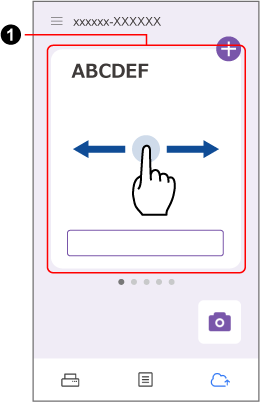
Tap the [Change the settings] button.
Tap [Cloud storage service setting].
In [Destination], re-specify a cloud service in which scanned images are to be saved.
B11Cg061, B11Cg066
- Cause
-
There is a problem with the service provider (server).
- Solution
-
Check the status and settings of your network environment, and try again. Or, wait for a while and try again.
B11Cg063
- Cause
The maximum size of a file has been exceeded.
- Solution
Do not scan a document other than a business card.
B11Cg064
- Cause
The maximum resolution has been exceeded.
- Solution
Do not scan a document other than a business card.
B11Cg067
- Cause
-
The issue may be caused by the following:
Connection to the cloud service failed.
Communication with the cloud service was disconnected.
A connection timeout occurred.
- Solution
-
Check the status and settings of your network environment, and try again. Or, wait for a while and try again.