


Image Scanner Software PaperStream ClickScan
Overview
Scanning interface dedicated to simplicity
PaperStream ClickScan software comes with simple operations and takes the complexity out of document scanning with RICOH fi/SP Series image scanner. It is ideal for spot or ad-hoc uses such as saving conference materials in personal folders.
- Scan your way—from right-click menu to save instantly, or one-push from the device
- Gateway to easy use of fi and SP Series technology
- Flexible use in conjunction with PaperStream Series
Features
Easy and Effective Document Digitization
PaperStream ClickScan is designed to make scanning easy from the start. Because administrators do not need to preset scan settings or output destinations, operators can start using the scanner immediately. Its simple, intuitive design also reducing wait time and supporting a smoother workflow.
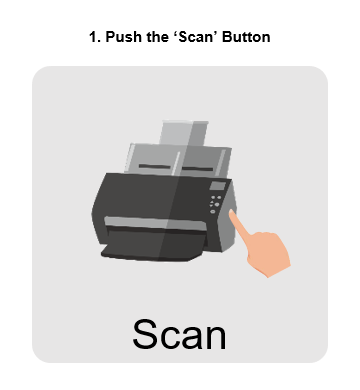
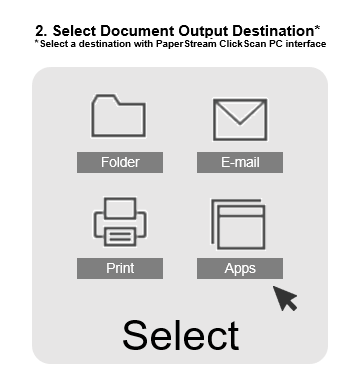
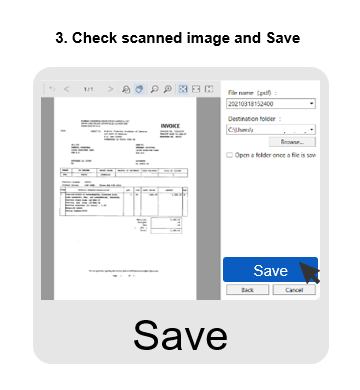
Scan Your Way—Right-Click or One-Push from the Device
Expand the use of PaperStream ClickScan and experience added flexibility and convenience to complete your scans.
Simply open the right-click menu at your destination folder where you want to save the data.
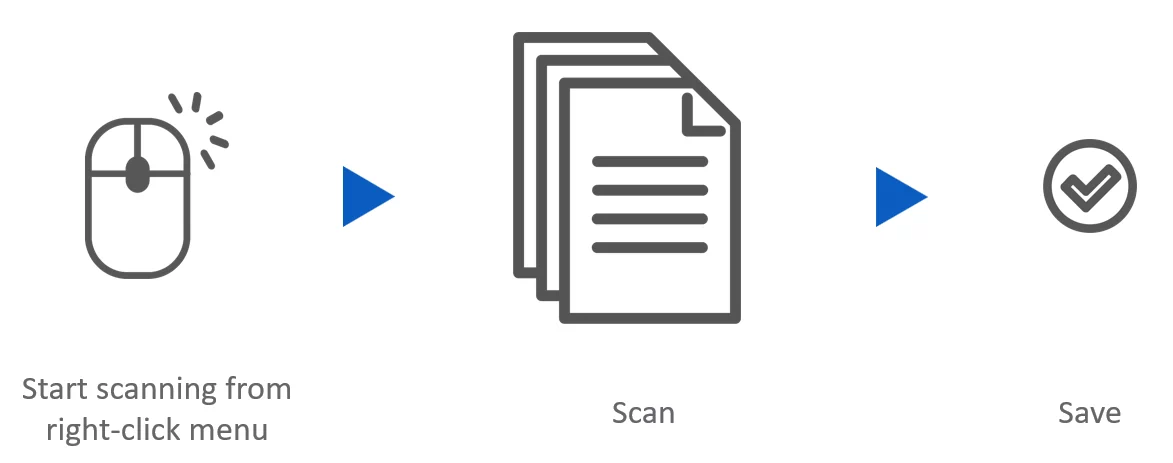
Customize settings like the color mode, resolution, page size and file format, in advance, directly using the 3-step scanning process on the software interface and be on your way to scan.
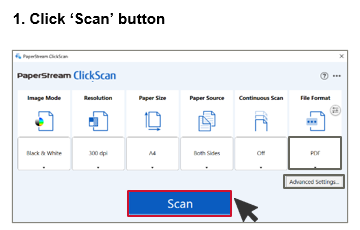
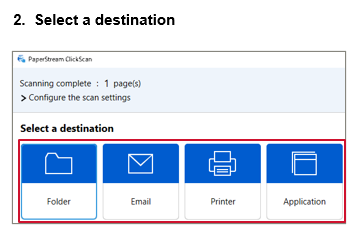
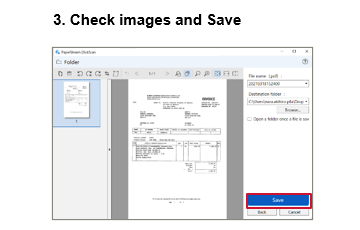
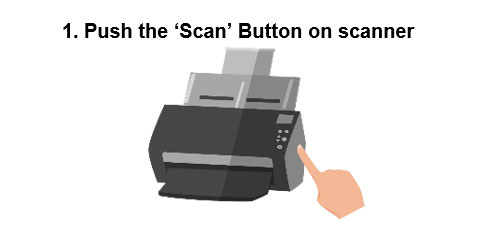
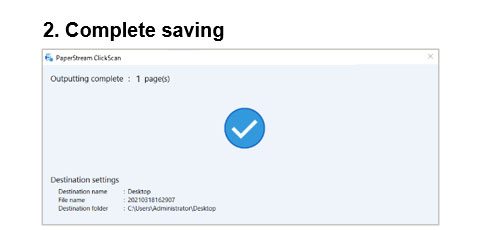
Advance settings on preferred save-to destinations and preview settings further streamlines the 3-step scanning process to just "One-Push" on the 'Scan' button.
Flexible use in conjunction with PaperStream Series
Choose from the 4 options of PaperStream Series scanning software according to your operation environment.
|
|
|
|
|
| Bundled Software | Bundled Software | Annual License Software | |

|

|

|

|
|
High Quality Image Processing Scanner Driver |
|||
▼ |
▼ |
▼ |
|
|
|
|
|
 ・Use for scanning documents occasionally
 ・Always read business documents in a fixed way
 ・Share scanning and confirmation work as a team
Specifications
As of October 6, 2026
| Supported scanners | Workgroup | fi-8040/fi-70F/fi-8170/fi-8270/fi-8150/fi-8250/fi-7300NX/fi-800R/SP-2240N/SP-2230N/SP-2240/SP-2230/SP-1425 | |
|---|---|---|---|
| Departmental | fi-8190/fi-8290/fi-7480/fi-7460 | ||
| Production | fi-8950/fi-8930/fi-8820/fi-7700/fi-7700S/fi-7600 | ||
| Discontinued | fi-7900/fi-7800/fi-7030/fi-7180/fi-7280/fi-7160/fi-7260/fi-7140/fi-7240/fi-65F/SP-1130N/SP-1125N/SP-1120N | ||
| Language*1 | Japanese, English, French, German, Italian, Spanish, Chinese (simplified), Chinese (traditional), Russian, Korean, Portuguese (Brazil), Arabic, and Turkish | ||
| Compatible Scanner Driver | PaperStream IP 3.0.1 or later (TWAIN) | ||
| Scanning | Simple Scanning, Ad-hoc Scan | ||
| Destination | Standard | Local folder, E-mail (via e-mail application), Print, Link to Application | |
| Optional*2 | Cloud services (Microsoft SharePoint Online/Microsoft OneDrive/Google Drive/Dropbox), E-mail (through SMTP server), Internet FAX (through SMTP server) | ||
| Output File | PDF, Searchable PDF, Password-protected PDF, JPEG, TIFF(single/multi-page), BMP, Word, Excel, PowerPoint | ||
| Supported Operating System*3 | Windows 11, Windows 10*4 | ||
| Hardware Requirements |
CPU*5 | Intel or Intel-compatible processors | |
| Display Resolution*6 | 1024×768 pixels or higher, 65,536 or more colors | ||
| Disk Capacity*7 | 10 GB or more | ||
- For the following languages, only text recognition with searchable PDF is supported: Greek, Vietnamese, Swedish, Dutch, Polish, Czech, Romanian, Hebrew, Ukrainian.
- Available when PaperStream Connecter Option is installed.
- This software is a 32-bit application that runs on 64-bit operating systems.
- Operates as a desktop application.
- Scanning speeds may vary due to the system environment.
- When the font size is large, some screens may not be displayed properly. In such a case, use a smaller font size.
- Enough disk drive and disk capacity is necessary for the saved file when scanning.


